How to Switch From an ECC-Signed Certificate to RSA
Table of Contents
- Switching a Let’s Encrypt Certificate to RSA
- Switching a Sectigo Certificate to RSA
- Next Steps
- Have more questions?
DNSimple provides SSL certificates using elliptic curve (ECC) keys by default, but some situations require an RSA key as the certificate signing key. Follow the steps below for your certificate type.
Switching a Let’s Encrypt Certificate to RSA
Let’s Encrypt certificates cannot be reissued, so you will need to order a new certificate or manually renew an existing one.
Steps to get an RSA-signed Let’s Encrypt certificate
- Disable auto-renewal on the existing ECC certificate you want to replace.
- Renew the certificate if it is about to expire, or order a new certificate.
- On the certificate configuration page, select the radio button for the signature algorithm.
- Submit the order.
See our guides for ordering and renewing Let’s Encrypt certificates.
Switching a Sectigo Certificate to RSA
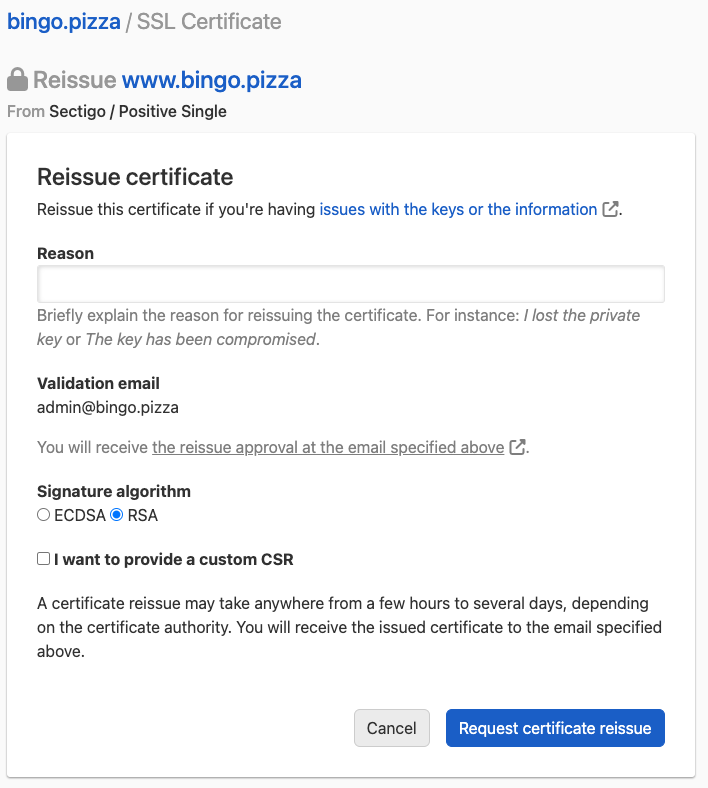
For Sectigo certificates, you can reissue the existing certificate with an RSA key.
Steps to reissue a Sectigo certificate with RSA
- Follow the process for reissuing a Sectigo SSL certificate.
- In the reason field, explain that you need an RSA-based certificate.
- Select the radio button for the signature algorithm.
- Provide your CSR content in the text area if you have a custom CSR.
- Submit the reissue request.
Next Steps
Once the new certificate is issued, you will need to configure, verify, and install it on your server:
Have more questions?
If you have additional questions or need any assistance switching from ECC to RSA, just contact support, and we’ll be happy to help.