How to Buy a Sectigo SSL Certificate
Last updated
Table of Contents
DNSimple provides an SSL certificate interface you can use to purchase a new SSL certificate. Buying a Sectigo certificate through DNSimple costs $20 per year for a single-name certificate or $100 per year for a wildcard SSL certificate.
Starting March 15, 2026, Sectigo SSL certificates sold by DNSimple are valid for a maximum of 200 days due to CA/Browser Forum requirements. You will need to purchase a new certificate before it expires to maintain uninterrupted coverage. Seven days before the certificate expires, you will begin receiving renewal notices.
Before You Start
To order an SSL certificate you need a DNSimple account.
Note
You do not need an active subscription to buy or renew a Sectigo certificate. Without one, you pay for the certificate at checkout.
You can order an SSL certificate for a domain, even if the domain is hosted elsewhere or registered with another registrar. You are not required to transfer or host a domain with us to purchase a Sectigo SSL certificate.
Please ensure you comply with all the technical requirements in our Getting Started with SSL Certificates page before ordering the certificate.
For more details about the configuration, approval, and installation of the certificate, read the Getting Started with SSL Certificates article, or follow the instructions on the site after you purchase the SSL certificate order.
If you are looking to renew an existing certificate, read How to Renew a Sectigo SSL Certificate.
Ordering a Sectigo SSL Certificate
Before purchasing an SSL certificate, read the Getting Started with SSL certificates article to make sure you are familiar with the SSL certificate process.
The order is the first step in getting an SSL certificate. It will create an SSL certificate order that represents a request for a certificate to the CA.
Ordering a certificate
- If you have more than one account, select the relevant one.
- If the domain is not already in your account, follow the instructions to add a domain without transferring it.
- If the domain is already in your account, on the top-nav menu, click the tab, then click .
-
On the page, under Sectigo, choose the domain from , then click .

-
Configure the certificate details:
- In , enter the subdomain the certificate is for. Use
*to order a wildcard SSL certificate. A certificate forwwwalso covers the root domain. To decide which name you need, see How to Choose SSL Certificate Names. - Under , leave selected, or choose if your server requires RSA. Choose only if you need a custom CSR. When DNSimple generates the key, it follows our private key policy.
- In , enter the subdomain the certificate is for. Use
-
Click if you have a subscription.

If you do not have a subscription, click and pay for the certificate.

-
Once the certificate is paid for, choose an address under and click .
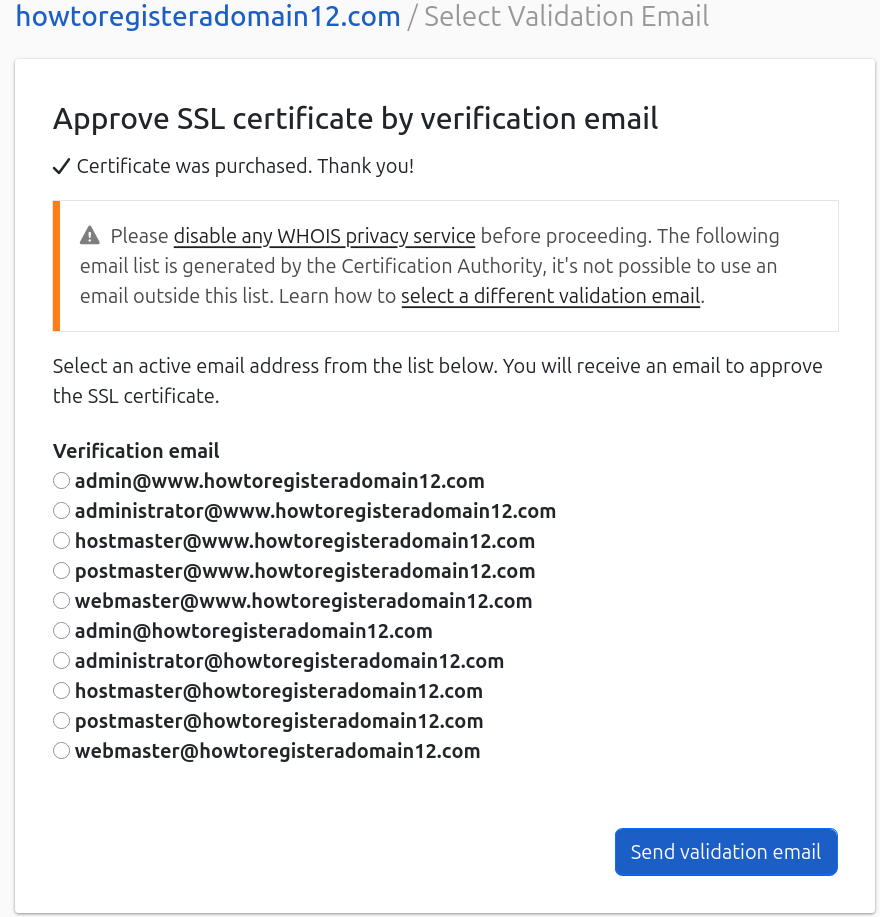
- Follow the steps in the validation email to complete domain validation.
Note
The certificate price will be held on your card immediately. Your card will be charged once the certificate is issued. If the issuance fails, funds will be released.
Next Steps
Once you order the certificate, you will have to install and configure the certificate.
See how to install a certificate.
Have more questions?
If you have any questions about purchasing Sectigo certificates with DNSimple, contact us, and we’ll be happy to help.