Multi-Account Management for Enterprise Clients
Last updated
Table of Contents
- Managing accounts within your contract
- Viewing accounts associated with your contract
- Have more questions?
Enterprise customers can manage multiple separate DNSimple accounts under a single contract.
Note
This feature is exclusively available to our Enterprise customers. If you’re interested in exploring our Enterprise options and the benefits of multi-account management, please contact our sales team.
This setup provides:
- Enhanced control for businesses with multiple entities that need independent domain and DNS management
- Improved account security through account separation
- Simplified billing across your various business units
- A centralized view of associated accounts for administrators with access to all accounts in the contract
Managing accounts within your contract
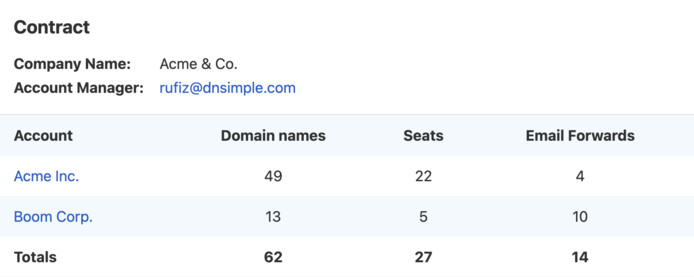
The card, which lists associated accounts, is visible only to users with administrator privileges on all accounts in the Enterprise contract.
To add or remove accounts from your Enterprise contract, please contact your DNSimple account manager.
Viewing accounts associated with your contract
To view accounts linked to your Enterprise contract
- Select the relevant account from the account switcher.
- Open .
- Under the tab, scroll to the card.
The card shows an overview of your multi-account setup, including for each associated account:
- Company name: The name associated with the account
- Account manager details: Contact information for your DNSimple account manager
Account summary
- Account name: The individual name of the account
- Domain names: The number of domains managed in that account
- Seats: The number of users with access to that account
- Email Forwards: The number of email forwards in that account
Contract totals
- Total domain names: Domains across all accounts under the contract
- Total seats: Members across all accounts in the contract
- Total email forwards: Email forwards across all accounts in the contract
Have more questions?
If you have questions about multi-account management, contact support, and we will be happy to help.