Export Domain Names to a .CSV File
You can export your domain names from DNSimple to a .CSV or .ZIP file for backup, auditing, or migration to another provider.
Table of Contents
- TOC
How to export your domain names list as a .CSV file
- Visit the Domain Names page for your account.
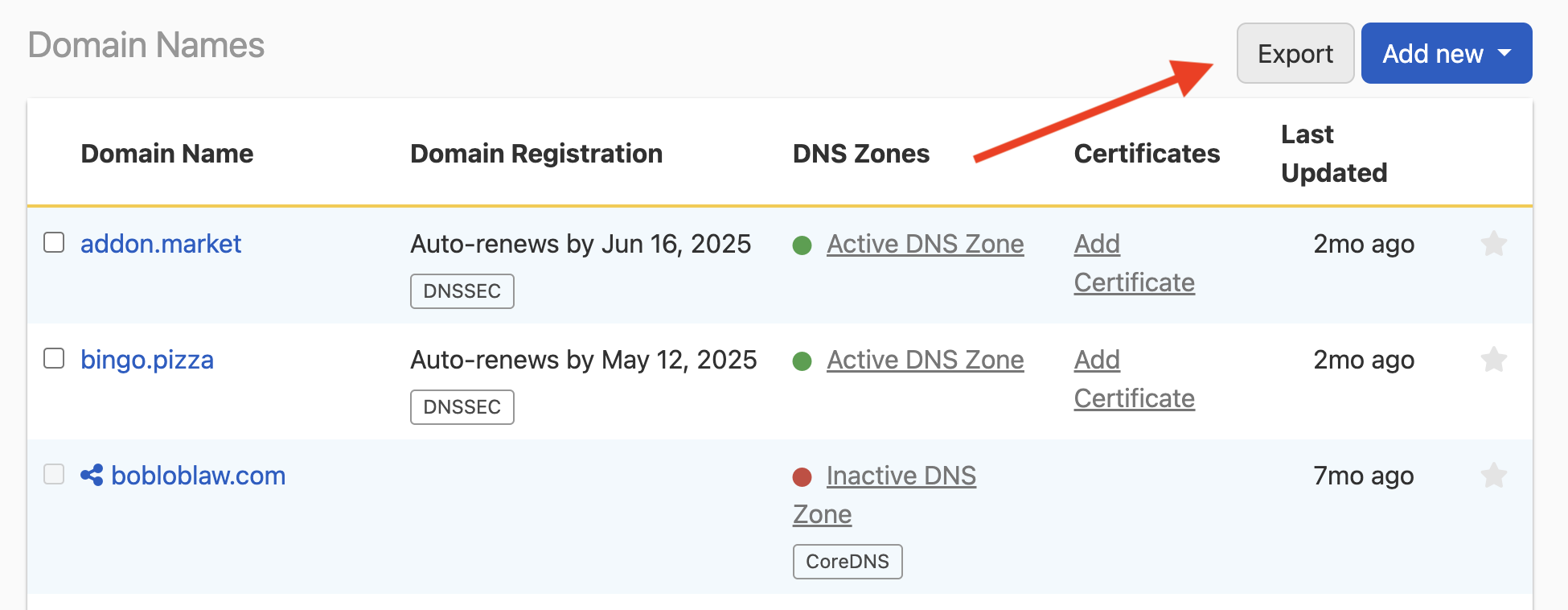
- Click Export in the top right.
- You should see a banner notification that your .CSV file is being generated and will be emailed to you when it’s ready (less than 5 minutes).
Note
If you have more than 10k domains in your account, you’ll receive the attachment as a .ZIP file.
What’s in the .CSV file?
We include domain registration and DNS zone details in the exported file:
| Attribute | Description |
|---|---|
| domain_name | name of the domain |
| labels | labels that have been attached to the domain |
| tld | the tld of the domain |
| registration_state | the current registration state |
| registration_contact | the current registration contact |
| expiration_date | the date the domain expires |
| renew_by | the date the domain must be renewed by |
| auto_renews | whether the domain auto-renews |
| premium_domain | whether the domain has premium pricing or not |
| renewal_price | the domain renewal price |
| whois_privacy | whether the registration has Whois privacy protection |
| dnssec | whether DNSSEC is enabled on the DNS zone |
| registry_name_server_records | the name servers listed at the registry |
| zone_name_server_records | the NS records for the zone (according to DNSimple) |
| zone_active | whether the zone is resolving |
| reverse | whether the zone is reverse or not |
| has_secondary | whether and which type of secondary zone |
| zone_providers | the integrated zone providers |
| certificates_count | the number of related certificates |
| email_forwards_count | the number of related email forwards |
Have more questions?
If you have any questions or need any assistance exporting your domains, contact support, and we’ll be happy to help. You can also read more about domain registration at DNSimple.