How to Buy a Wildcard SSL Certificate
Last updated
Table of Contents
- Before You Start
- Ordering a Let’s Encrypt Wildcard SSL Certificate
- Ordering a Sectigo Wildcard SSL Certificate
- Next Steps
- Have more questions?
Wildcard SSL certificates allow you to secure an unlimited number of names belonging to a single subdomain level. They contain an * as the hostname.
    APEX (root) Domain
      _____|____
     /          \
   *.dnsimple.com
   |
wildcard
Before You Start
- Determine whether you need a Let’s Encrypt (free, 90-day validity) or Sectigo (paid, 200-day validity as of March 2026) wildcard SSL certificate. See Sectigo vs Let’s Encrypt for a detailed comparison.
- Let’s Encrypt wildcard SSL certificates are available on the Solo Pro plan and higher. See the differences between plans.
- Sectigo wildcard SSL certificates support only one wildcard name per certificate.
Warning
When ordering a Let’s Encrypt wildcard SSL certificate, the wildcard (*) will only secure subdomains. A wildcard SSL certificate cannot secure the root domain (such as example.com). If you want to secure both the root domain and subdomains with Let’s Encrypt, you will need to order an additional certificate.
Ordering a Let’s Encrypt Wildcard SSL Certificate
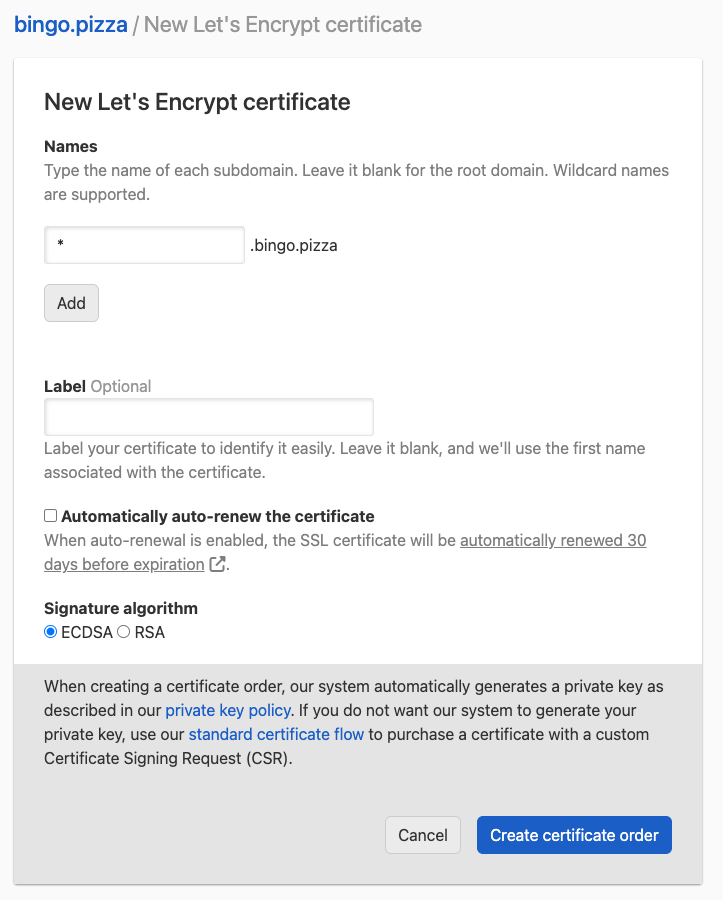
Steps to order a Let’s Encrypt wildcard SSL certificate
- Follow the instructions to order a Let’s Encrypt certificate.
-
In , use the
*character to represent the subdomain level you want the certificate to cover.- To request a certificate for
*.example.com, enter*. - To request a certificate for
*.app.example.com, enter*.app.
- To request a certificate for
- Optionally, add more names to the same certificate. Multiple names (Subject Alternative Names, or SANs) are available on the Solo Pro plan and higher.
- Submit the order. DNSimple will automatically handle the DNS-based validation.
Ordering a Sectigo Wildcard SSL Certificate
Steps to order a Sectigo wildcard SSL certificate
- Follow the instructions to order a Sectigo certificate.
-
In , use the
*character to represent the subdomain level you want the certificate to cover.- To request a certificate for
*.example.com, enter*. - To request a certificate for
*.app.example.com, enter*.app.
- To request a certificate for
- Complete the remaining order steps, including choosing the option and submitting the order.
- Complete email-based domain validation when prompted.
Next Steps
Once your wildcard SSL certificate has been issued, install it on your server:
- How to Install an SSL Certificate
- How to Choose SSL Certificate Names, to understand how wildcard names are matched
Have more questions?
If you have additional questions or need any assistance ordering a wildcard SSL certificate, just contact support, and we’ll be happy to help. You can also read more about DNSimple Enterprise.