Understanding Your Account Balance and Billing Details
Last updated
The Billing and plans page shows your upcoming subscription charges, account credit, payment method on file, invoice history, and account notification email. Use this page to understand what your account may be charged for and when the next payment is due.
Table of Contents
Where to find your billing details
- Choose the relevant account from the account switcher, then click the gear icon next to the account name to open Account settings.
- Select the Billing and plans tab on the left side of the screen.
Your estimated amount due and next payment date appear at the top of this page. For help reading charges after they post, see Understanding Your DNSimple Invoice and Subscription Renewals.
Billing details breakdown
On the Billing and plans page, you can view:
Estimated amount due
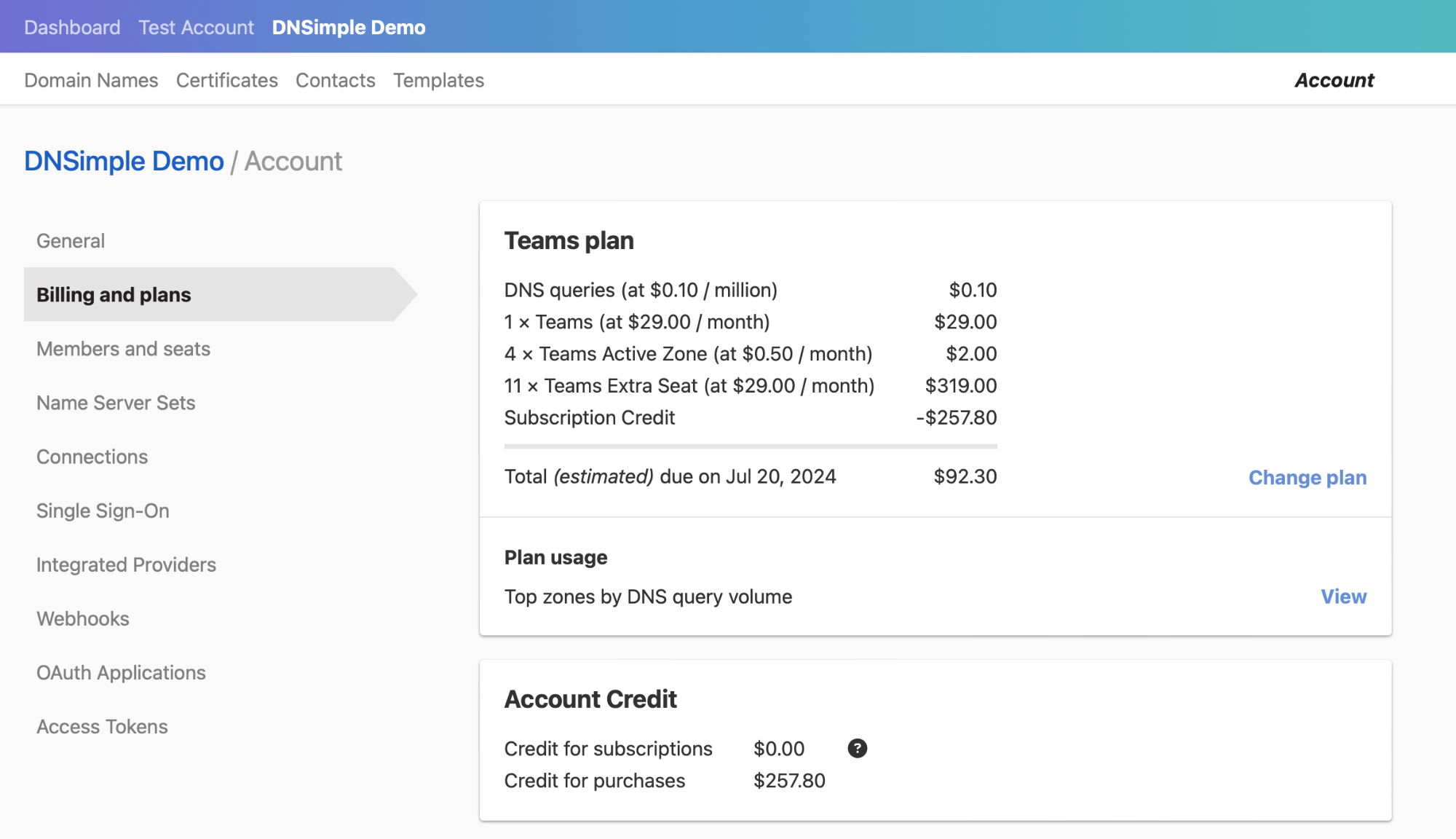
The plan section shows your current plan and the total estimated due on your next payment date. This is the amount DNSimple expects to charge to the card on file based on your current subscription and account usage.
This amount is broken up into:
- DNS queries
- Subscription cost (Solo Pro and Teams base fee only; Solo has no base subscription fee)
- Active zones
- Extra seats (Teams plan and higher)
- Email forwards
- Account credits (when applicable)
Note
Your subscription fee covers access to your plan features. Zone hosting and query volume above your plan’s allowance are billed separately as usage-based charges.
Plan usage
The Plan usage section shows usage-based activity for the current billing period, including top zones by DNS query volume.
Click View in the Plan usage section to see more details about DNS query volume.
Account credit
The Account Credit section appears when the account has credit. DNSimple deducts future payments from that credit before charging your card. Account credit falls into two categories:
- Credit for subscriptions: This credit is only used to cover subscription fees.
- Credit for purchases: This credit is used for purchases, such as registering, renewing, and transferring domains, adding WHOIS privacy, and buying SSL certificates. DNSimple also uses this credit to cover your subscription fees before charging your card on file.
Credit card
This section shows the credit card on file for the account, with the card type and last four digits as its heading, and the expiration date below. If no card is on file, click Add card. Click Edit to update the card. See Changing Payment Details for step-by-step instructions.
Invoices
The Invoices section shows past invoices for the account. You can view all invoices, download the latest invoice, and see where invoices are delivered.
By default, invoices go to the account notification email. If the account has no notification email, they go to the account administrators. Accounts on the Teams plan and higher can set a separate billing email in Billing Settings.
For invoice line items and charge types, see Understanding Your DNSimple Invoice. To look up past invoices by status, see Account Invoice History.
Have more questions?
If you have any questions about your billing or account details, contact support, and we’ll be happy to help. You can also read more about DNSimple pricing.