Digital Wallet Replenishment
Last updated
Table of Contents
- Adding funds to your wallet
- Replenishment budget
- Low balance alerts
- Custom email
- Have more questions?
Enterprise customers can add funds to a digital wallet for future purchases, such as domain registrations, domain renewals, domain transfers, and SSL certificates. DNSimple supports ACH, wire transfer, and card payments to add funds to your digital wallet. For the other ways to pay DNSimple, see Supported Payment Methods.
Note
Automatic wallet replenishments are not yet available. You need to manually add funds to your wallet.
Adding funds to your wallet
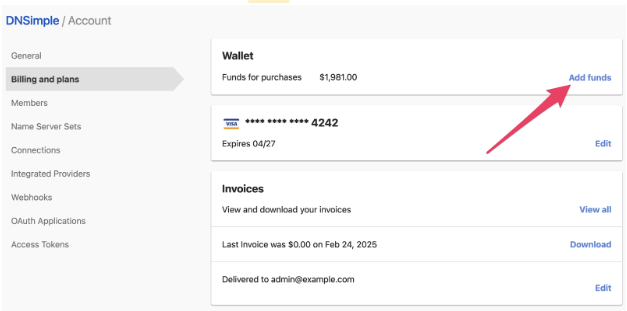
To add funds to your digital wallet
- From the account switcher, select the account you want to fund. This takes you to the domain list for that account.
- Open from the account switcher at the top-right corner of the screen.
- Select the tab on the left side.
-
On the card, click .
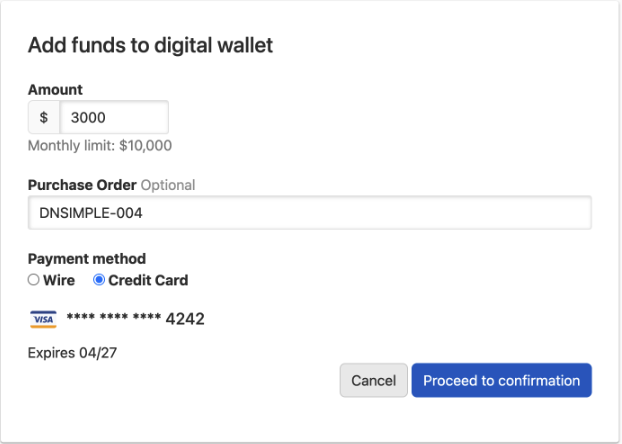
- Fill in the replenishment amount, an optional purchase order ID, and a payment method (credit card or wire).
-
Click .
-
Verify the details, then click .
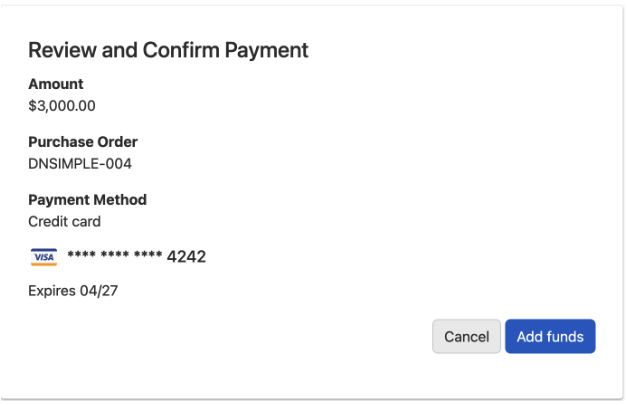
The funds are added to your digital wallet immediately, and you will receive a corresponding invoice.
Payments by card
Your card on file will be charged. You cannot currently add an alternate card for wallet replenishments.
Payments by wire
All wire payments must be paid within 30 days after receiving the invoice. To discuss different payment terms, contact your account manager.
Replenishment budget
You can configure a monthly limit for wallet replenishment.
This limit cannot be exceeded. Once the limit is reached, all subsequent wallet replenishments are denied. The cumulative total of replenishments is tracked throughout the month. At the start of each new month, this total resets and the full budget allocation is available again.
To set up a replenishment budget, contact your account manager.
Low balance alerts
DNSimple monitors your wallet balance and sends automatic notifications when it falls below a predetermined threshold. This gives you time to add funds before running out.
Contact your account manager to customize your low balance alerts.
Custom email
All wallet replenishment notifications are sent to the billing email address on your account. To send these notifications to additional email addresses, contact your account manager.
Have more questions?
If you have questions about wallet replenishment, contact support, and we will be happy to help. You can also read more about DNSimple Enterprise.