How to Set Up Auto-Renewal for SSL Certificates
Table of Contents
- Before You Start
- How Auto-Renewal Works
- Enabling Auto-Renewal for a Let’s Encrypt Certificate
- Enabling Auto-Renewal When Ordering a New Certificate
- Verifying Auto-Renewal Is Active
- Disabling Auto-Renewal
- Troubleshooting Auto-Renewal Failures
- Certificate Lifetime Changes (2026-2029)
- Have More Questions?
- Related Reading
Auto-renewal ensures your SSL certificates are automatically renewed before they expire, reducing the risk of downtime caused by expired certificates.
Before You Start
Let’s Encrypt certificates
- Auto-renewal is supported in DNSimple.
- To enable auto-renewal on an existing certificate, you need an active, non-expired certificate in your DNSimple account.
- The domain must be delegated to and exclusively resolving with DNSimple.
- Let’s Encrypt certificates are not compatible with Secondary DNS, because DNSimple must create the DNS records used for validation.
- An active DNSimple subscription is required for the DNS hosting and automation that support Let’s Encrypt issuance and renewal.
Sectigo certificates - Auto-renewal is not available in DNSimple. See How auto-renewal works for details.
Auto-renewal is available for free to all DNSimple accounts.
Note
Auto-renewal handles the certificate issuance process automatically, but you still need to install the renewed certificate on your server once it is issued. Consider using the DNSimple certificate API to automate the installation step.
How Auto-Renewal Works
When auto-renewal is enabled, DNSimple automatically submits a renewal request before the certificate expires:
- Let’s Encrypt certificates (90-day validity): Renewal begins 30 days before expiration (at the 60-day mark), as recommended by Let’s Encrypt. If the initial attempt fails, DNSimple retries automatically every day until the certificate is renewed or expires.
- Sectigo certificates (200-day validity as of March 2026): Auto-renewal is not currently available for Sectigo certificates. You must manually renew your Sectigo certificate before it expires.
Once the renewed certificate is issued, you will receive an email and webhook notification. The new certificate will then be available to download from your DNSimple account.
Warning
Auto-renewal does not install the certificate for you. After receiving the renewal notification, you must download and install the new certificate on your server. If you do not replace the old certificate, browsers will display security warnings once the original certificate expires.
Enabling Auto-Renewal for a Let’s Encrypt Certificate
Steps to enable auto-renewal
- Log into DNSimple with your user credentials.
- If you have more than one account, select the relevant one.
- On the header, click the tab, locate the relevant domain, and click on the name to access the domain page.
- Scroll down to the section and click on the Let’s Encrypt certificate you want to auto-renew.
-
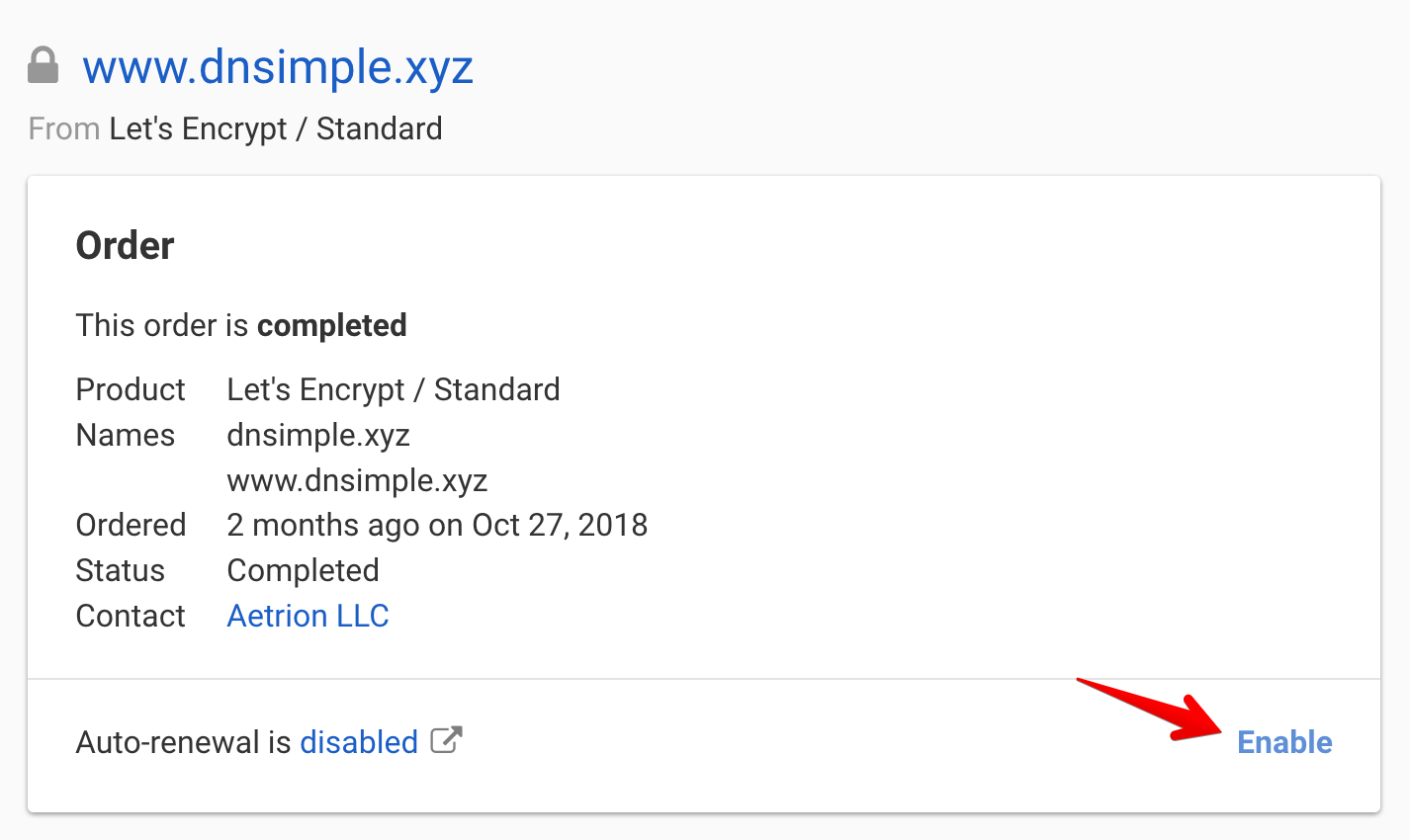
On the certificate page, locate the auto-renewal toggle and enable it.
Note
The certificate must not be expired to enable auto-renewal. If your certificate has already expired, you will need to order a new Let’s Encrypt certificate instead.
Enabling Auto-Renewal When Ordering a New Certificate
You can also enable auto-renewal at the time you order a new Let’s Encrypt certificate:
Steps to enable auto-renewal during ordering
- Follow the steps to order a Let’s Encrypt certificate.
- On the certificate configuration page, check the option to automatically renew the certificate.
- Complete the order. Auto-renewal will be active as soon as the certificate is issued.
Verifying Auto-Renewal Is Active
Steps to verify auto-renewal status
- Navigate to the domain page for the domain with the certificate.
- Scroll to the section and click on the certificate.
- On the certificate page, confirm that the auto-renewal toggle is enabled.
Disabling Auto-Renewal
Steps to disable auto-renewal
- Navigate to the certificate page following the same steps above.
- On the certificate page, toggle the auto-renewal setting to disabled.
Note
Disabling auto-renewal means you will need to manually renew the certificate before it expires. You will still receive expiration notices starting 30 days before the certificate expires.
Troubleshooting Auto-Renewal Failures
If auto-renewal fails, DNSimple will retry automatically each day. Common reasons for failure include:
- Domain no longer resolving with DNSimple: Let’s Encrypt certificates require DNS-based validation. If the domain is no longer delegated to DNSimple’s name servers, the automatic DNS challenge will fail. Re-delegate the domain to DNSimple to resolve this.
- Rate limits: Let’s Encrypt enforces rate limits on certificate issuance. If you have requested many certificates for the same domain recently, you may need to wait before a renewal can succeed.
- Subscription lapsed: Some renewal features require an active DNSimple subscription. Verify your subscription status if renewals are not processing.
If auto-renewal continues to fail, contact support for assistance.
Certificate Lifetime Changes (2026-2029)
The CA/Browser Forum has approved shorter certificate lifetimes that will take effect in phases from 2026 through 2029. As certificate lifetimes decrease, auto-renewal becomes increasingly important to avoid gaps in coverage:
- March 2026: Sectigo certificates valid for a maximum of 200 days.
- March 2027: Maximum validity reduced to 100 days.
- March 2029: Maximum validity reduced to 47 days.
Let’s Encrypt certificates are already issued with 90-day validity, so the initial changes primarily affect Sectigo certificates. As lifetimes shorten further, automating both renewal and installation will be essential.
Have More Questions?
If you have additional questions or need any assistance with SSL certificate auto-renewal, just contact support, and we’ll be happy to help.
Related Reading
- Let’s Encrypt and DNSimple – Full details on the Let’s Encrypt integration
- How Does an SSL Certificate Renewal Work? – Understand the renewal process
- Renewing a Let’s Encrypt SSL Certificate – Manual renewal steps
- SSL Certificate Validity Changes (2026-2029) – Upcoming lifetime changes