Import Integrated Zone Records
If someone changes records directly at Amazon Route 53 or Azure DNS, import them to see the current records in the DNSimple Record Editor. Importing refreshes DNSimple’s view of the records at each Integrated DNS Provider. It does not change the records in the DNSimple zone. To copy the provider’s records into the DNSimple zone, sync them after importing.
To import records from your Integrated DNS Providers
- If you have more than one account, select the relevant one from the account switcher at the top-right corner of the screen.
- From the list, click the domain you want to manage.
- Click at the top-right of the domain page.
-
Click .
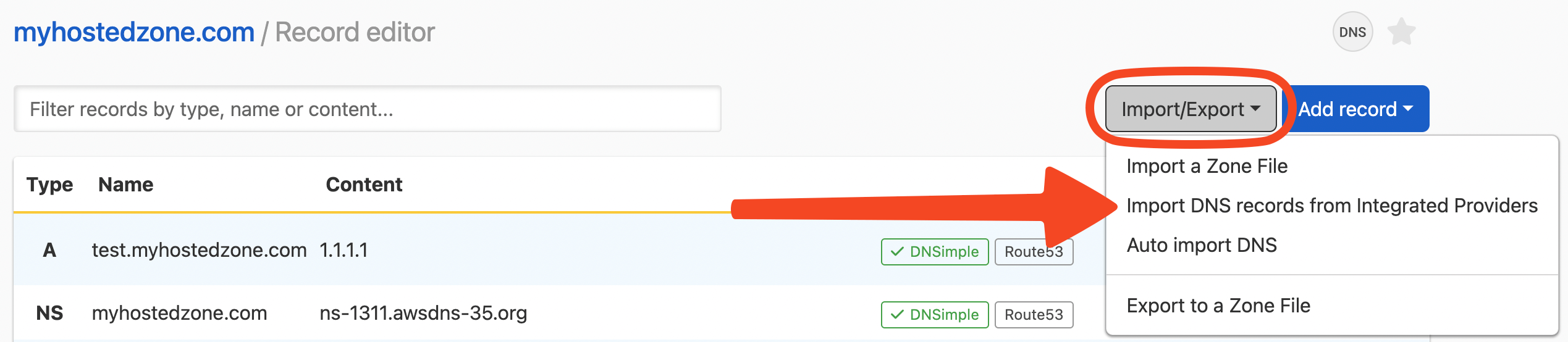
- Select .
DNSimple shows “Your zone records have been refreshed.” The option appears for any zone with an Integrated DNS Provider, including CoreDNS. CoreDNS loads its records from DNSimple, so importing only matters for Route 53 and Azure DNS.
Loading the page also refreshes all integrated zones in the account in the background. See Refresh and Import Integrated Zones.
Have more questions?
If you have additional questions or need any assistance with your integrated zone records, contact support, and we will be happy to help. You can also read more about DNSimple integrations.